

That’s why you should have the Copilot Readiness Scan carried out:
Avoid unexpected security issues. After all, you know what technical improvements you need to make to get started safely with Copilot.
Find out what support is needed to make using Copilot a success.
Get started straight away with a clear advisory report setting out all the risks, priorities and a feasible action plan.

Getting started safely and effectively with Microsoft Copilot
Microsoft Copilot can make your work a lot easier. But what if your Microsoft 365 environment isn’t yet properly set up for it? Then existing problems can suddenly become very apparent. Imagine an employee asking Copilot a question about their pay scale and unexpectedly seeing their colleagues’ salaries and details. Or a document containing sensitive customer information suddenly appearing in a Copilot response.
But even if you’ve sorted out security properly and purchased the licences, you’re not there yet. After all, what use is Copilot if your staff hardly ever use it?
Prepare yourself with the Copilot readiness scan
A clear overview in five steps:
1. Intake and scoping
During the intake, we work with you to define the objectives and scope, identify who is involved, and determine what you wish to achieve with Copilot. We also make practical arrangements regarding access, scheduling, who we will interview, and how we will provide you with feedback on the results.
From a thorough scan to clear advice
The technical scan: where are the risks?
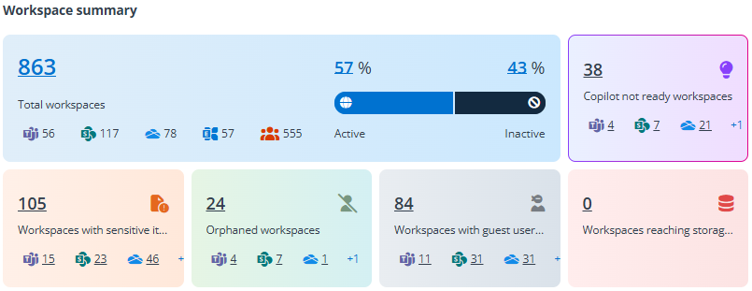
During the technical scan, we delve into your Microsoft 365 environment. Bwithin the agreed scope oWe’ll assess whether your digital working environment is ready for Microsoft Copilot and identify any potential risks or areas for improvement. In doing so, we’ll look at SharePoint, OneDrive, Teams and mailboxes, amongst other things.
What do we examine during the technical scan?
- Technical basis for Copilot: Is your digital working environment technically ready to use Copilot safely and effectively?
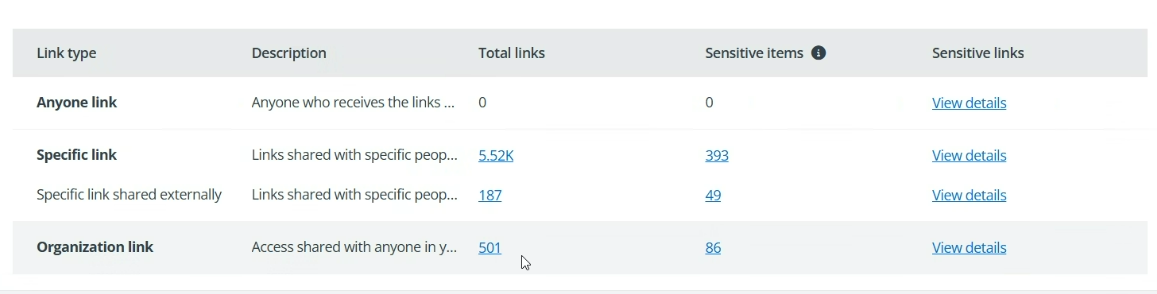
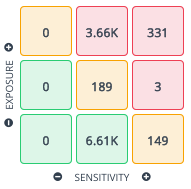
- Access rights and sharing: Who has access to what information? And what about external users, guest access and shared links?
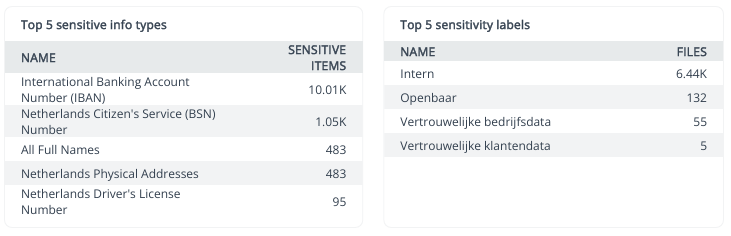
- Sensitive information: where is sensitive data stored, who can access it, and is it adequately protected?
- Outdated environments: are there any unused Teams, SharePoint sites or other environments where ownership or management has not been properly organised?
- Data quality and data pollution: how many outdated, redundant or duplicate files are there in your environment?
- Security and compliance: are the correct settings and measures in place to ensure Copilot can be used safely and effectively?

“Many scans I see around me only cover the technical side of the story”
The adoption scan: are your staff ready?
During the adoption scan, we’ll speak to one or more people within your organisation who have a good understanding of the work processes, staff and current use of AI. This helps us discover how well your organisation is prepared for the arrival of Copilot.
What do we examine during the adoption scan?
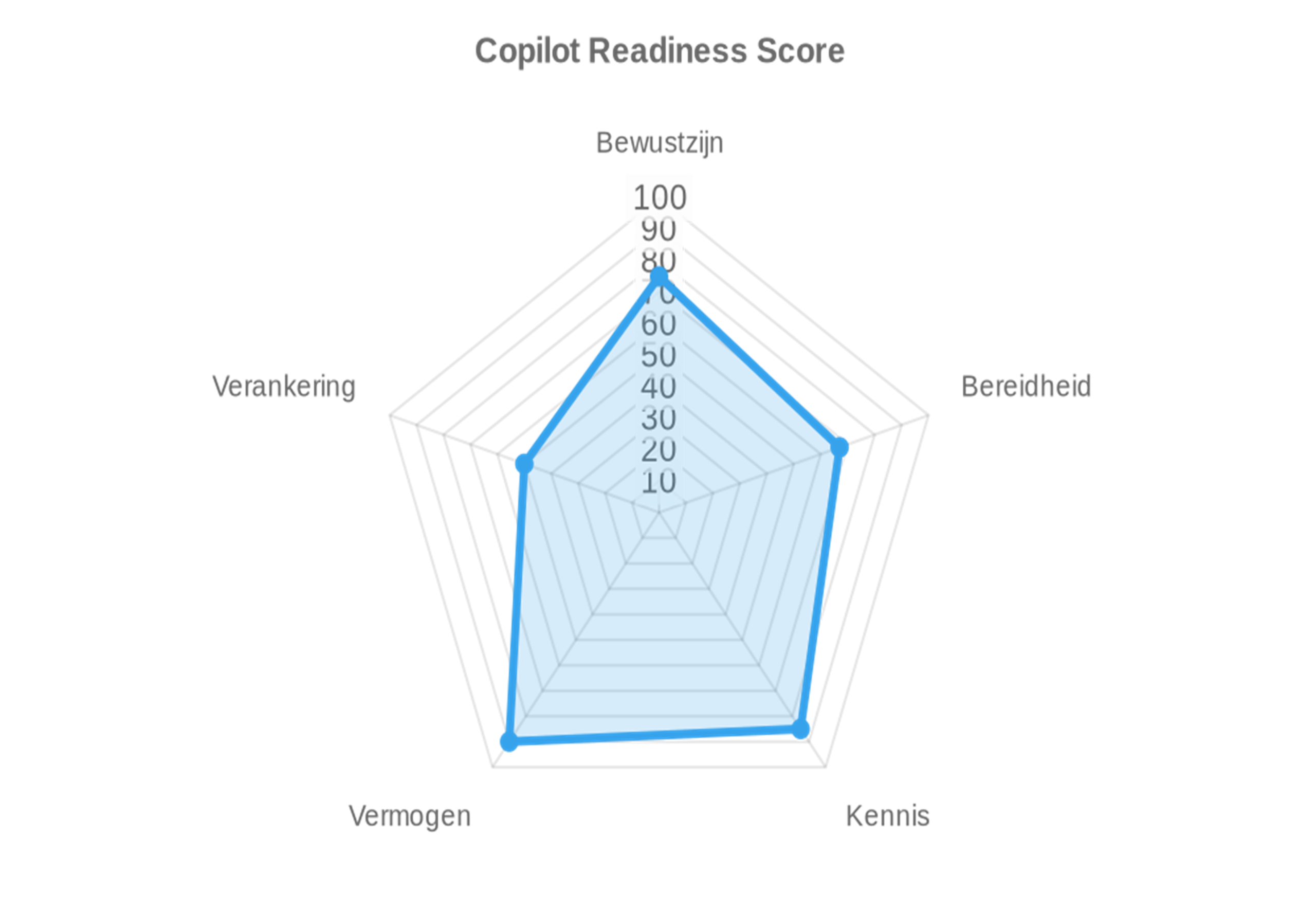
During the adoption scan, we use the ADKAR model. This model helps us gain insight into what employees need in order to understand changes, be open to them and apply them in the long term. We look at five components:
- Awareness: Do your staff know what Copilot is, what possibilities it offers and where its limitations lie?
- Willingness: are your staff open to using Copilot and do they recognise its added value in their day-to-day work?
- Knowledge: do staff know how to use Copilot and what guidelines are in place for the responsible use of AI?
- Skills and support: do your staff have the right knowledge, guidance and scope to use Copilot effectively and to critically assess the results?
- Embedding within the organisation: are policies, responsibilities, communication and training properly organised to ensure Copilot remains an integral part of the working day?
We also look at:
- Practical applications: Are there any specific tasks or processes where Copilot could save time or make the work easier?
- Risks and trust: what concerns exist regarding privacy, reliability, changes in the workplace and the responsible use of AI?
Get started straight away with a clear advisory report
Following the technical scan and the adoption scan, you will receive a recommendation report. In this report, we summarise the key findings and outline where your organisation stands, what risks and opportunities exist, and what steps you can take to implement Copilot safely and successfully.
The advisory report includes, amongst other things:
- Summary: A clear overview of how well your organisation is prepared for Copilot, including the key risks and opportunities.
- Approach and principles: what did we investigate, how did we go about it, and what data did we work with?
- Technical findings: insights into, amongst other things, access rights, external access, sensitive information, outdated environments and security settings.
- Adoption analysis: What do your staff think of Copilot, and what do they need to get started with it effectively?
- Concrete action plan: an overview of the key areas for improvement, including priorities and next steps. From mitigating risks and establishing clear agreements to preparing a pilot and the further roll-out of Copilot.

From advice to action
We’ll go through the advisory report with you and answer any questions you may have. Would you like to get started with the recommendations afterwards? Then we’d be delighted to help you take the next steps.
Valuable insights without placing too much of a burden on your organisation
Good to know: the Copilot readiness scan requires relatively little time and effort from your organisation. We carry out the technical scan largely independently, without any major changes to your IT environment. All we need is access to your Microsoft 365 tenant and permission to install the necessary application.
The intake meeting lasts up to one and a half hours; for the interviews for the adoption scan, we charge a maximum of one hour per The interview and discussion of the advisory report also take no more than an hour. The preparation required of your staff for the interview is minimal.
This way, with a limited time investment, you gain valuable insights and concrete advice to help you get started with Copilot.