
4 May, 2023
Microsoft Teams celebrates its 6th anniversary this month and is treating with its biggest update ever. The online collaboration tool had some 270 million monthly active users by 2022, making it one of the fastest-growing tools in the Microsoft ecosystem. Since 28 March, the public preview version has been made available to organisations. So we have now had about five weeks to play with the 'new' version of Teams. In this article, we describe what we have noticed, what has changed and what Microsoft says is still to come.
What caught our eye:
The performance
We work extensively with Microsoft Teams within IT Local and most of our employees have turned the slider to use 'the new' Teams. The first thing we noticed was the performance. Microsoft says it has rebuilt Teams from the ground up and slimmed it down considerably. It is noticeable.
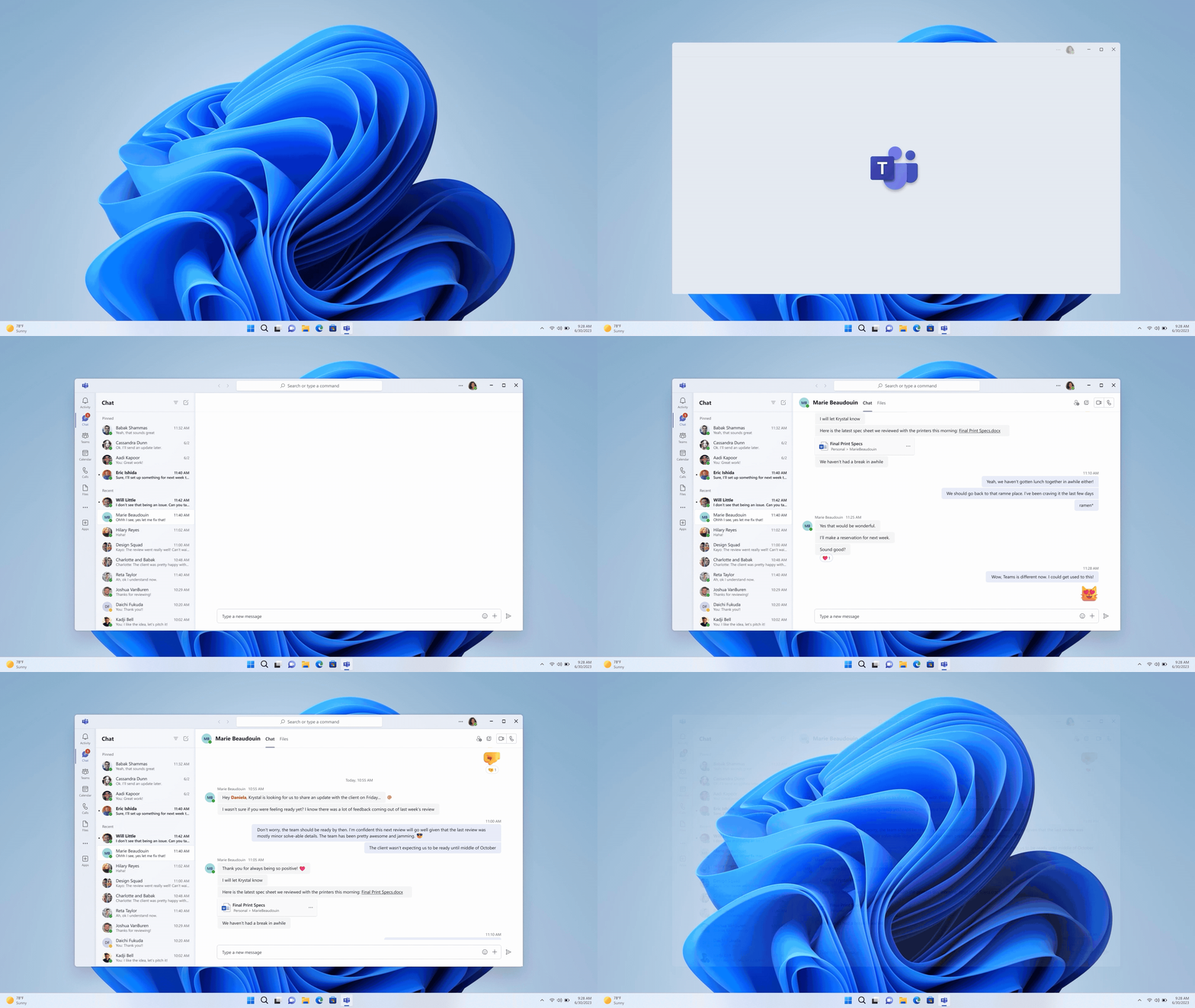
As you can see above, the app only takes half as long to start up, compared to what we were used to from Teams.
The task manager indicates that Teams uses 50% less memory than before. This lower consumption means less strain on the CPU, which means your computer will be able to run more programmes alongside Teams. So the programme will also become more accessible to less high-end devices. It also has a positive impact on the battery consumption of your device, and the image quality during video calls and meetings has also improved a lot. So there have been incredibly useful developments under the bonnet!
The design
The design has also been given a good overhaul. The classic Teams purple has been downgraded to an accent colour and was replaced by calmer-looking, light greyscale. This, combined with the fact that the resolution within the app has been improved, gives a feeling of more open space. Furthermore, a few features have been added to make the new Teams more pleasing to the eyes.
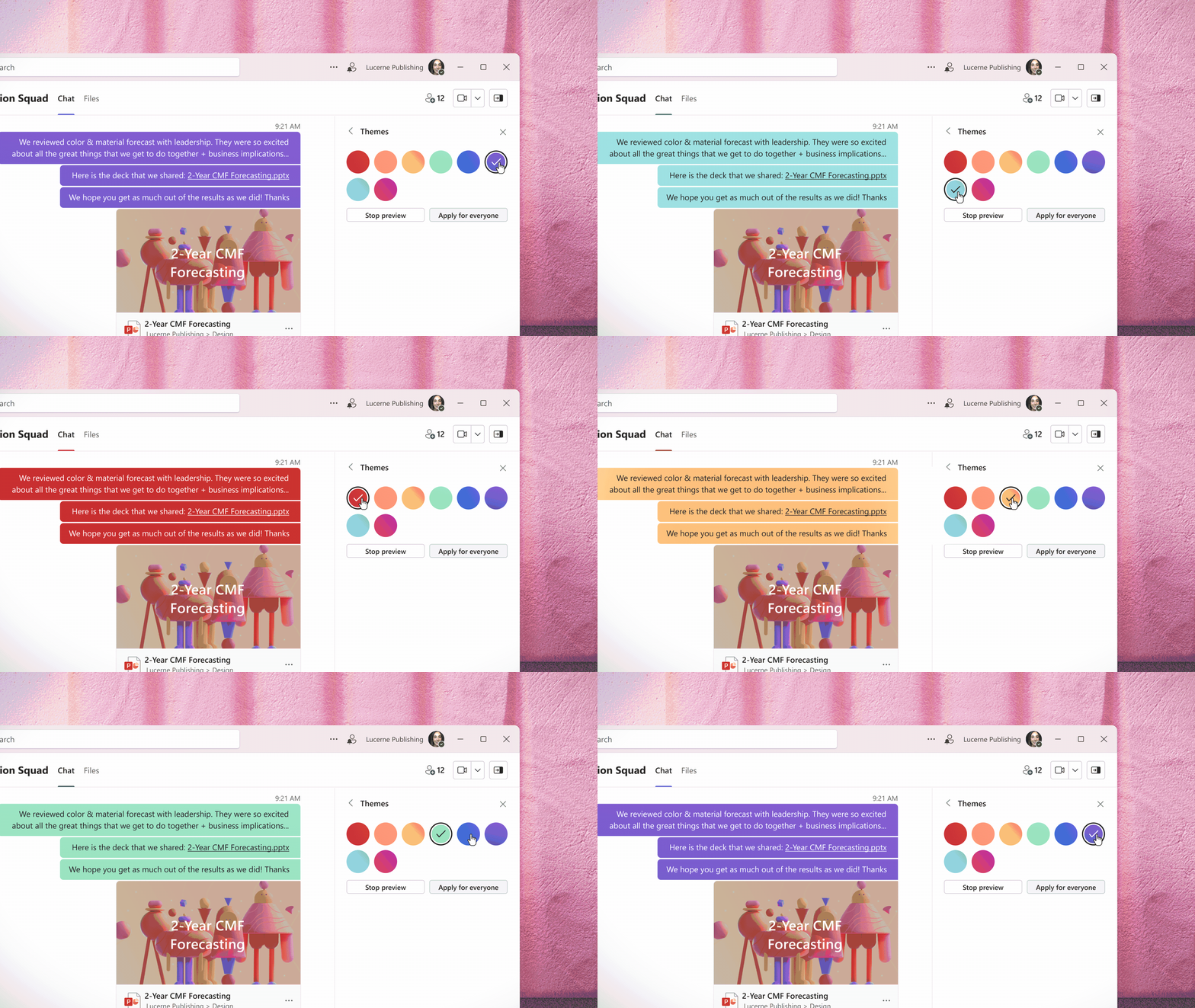
For instance, Teams now syncs its light and dark mode with your Windows device settings. You also get the option to customise the speech bubbles in different teams and chats or set group profile photos for your teams and group chats. This way, you can make your Teams just a little more uncluttered and personalised.
The ease of use
Then some things stand out about the ease of use. For instance, the new Teams environment includes the ability to set up multiple tenants (user profiles). This is ideal for anyone working with Teams in multiple organisations. Think, for example, of a student who needs to use Teams for both school and work. Instead of logging out with the school account and then having to log back in with the work account, the student can now simply and quickly switch profiles. Do you open a Teams meeting from your calendar in Outlook? Then the meeting automatically opens within the correct profile. Our IT consultants in particular, who work in both our own Teams environment and the environment of our customers, are especially lyrical about this change.
Within your Teams channels, new posts now appear at the top. Although this is a small change, it feels more logical and natural. Everyone is used to a feed putting the latest articles at the top by now, and Microsoft has capitalised on this too.
Furthermore, the minimised chat has had an overhaul. Previously, the notification window that appeared when you received a Teams message was just too small to display full messages, forcing you to open the window again to read or respond. After the new update, a larger window appears, with the full message and the option to reply to it directly from this mini-window.
What does our team think of Teams?

Robin Mulder
Engineer
Design
"Everything fits better into the overall Windows picture and looks a lot more modern."
Ease of use
"The convenience is largely unchanged. However, gifs are easier to find, which I like as a gif fan. The fact that the latest posts appear at the top is also a nice change. A pity, though, that shared files automatically open in 'read-only' mode."
Performance
"The image quality is much better and everything in general feels 1000x faster."

Jeroen Bos
Consultant
Design
"To my mind, the design is not quite finished yet. However, the resolution is a lot better, giving the app more open space. Personally, I liked the old version better."
Ease of use
"The ease of use of Teams was always top-notch, but considering they completely rebuilt the application, I think they could have got a lot more out of this update."
Performance
"The 'new' Teams feels faster and I no longer have to close the programme completely to run a PowerBI report, so that's great!"

Damian Kootstra
Service Desk employee
Design
"Not too much has changed, so everything still feels familiar. The colour scheme has improved dramatically though!"
Ease of use
"Nice that the new posts appear at the top. Quick replies in minimised mode have also improved; before, you could hardly ever read the full post and now you can read at a glance and reply right away."
Performance
"Everything is much faster. Noticeably less memory is consumed. The image quality also seems to be much better."
What's to come, according to Microsoft:
The old familiar apps
As we mentioned earlier, the public preview version is not quite finished. For instance, certain features are missing, including tabs within teams and channels, a working to-do app and an extension in customisation; such as the ability to customise the colour scheme within your groups. Microsoft did manage to tease some of these missing features already. We therefore expect updates to follow in the coming months to arrive at a more completed product, before the 'new' Teams is rolled out to all users.
Microsoft has promised to roll out an update in the near future, which will include third-party apps, line of business (LOB) apps and advanced options within calls and meetings.
CoPilot
In addition, there is another big change coming. Perhaps the biggest Teams has ever seen. For Microsoft is going to incorporate into Microsoft 365 their own A.I., a Large Language Model called CoPilot.
In the video below, Microsoft's Derek Snyder (Senior Director, Microsoft Teams) and Jeff Teper (President, Collaborative Apps & Platforms) tell you a bit more about the role CoPilot will play within Teams.
CoPilot has only been tested internally at Microsoft itself. So unfortunately we haven't been able to play with it ourselves yet, but what we understand from Derek and Jeff here is that CoPilot will only be available to those who pay for Teams Premium. The premium version of Teams has been around for some time, but until recently it had no unique advantage over the standard version. So that is about to change with the introduction of CoPilot.
Teams previously had an A.I. responsible for transcriptions, subtitling and translations within meetings. This role will be expanded considerably with the roll-out of CoPilot. Teper states in the video that security and simplicity are the two pillars on which the feature is built and then describes two future features: Recap and Business Chat.
Recap is a feature that lets you look back at what was discussed in a meeting, no matter what time you joined. Recap looks at the transcript of the meeting and breaks it up into chapters to give you a summary of the topics and action points covered.
They also briefly highlight the new Business Chat. According to Teper, this is an A.I. chat in which you can ask substantive questions about all kinds of issues within your organisation. This chat is integrated into Microsoft Graph, allowing Business Chat to access only those documents, files and correspondence to which the end user has permissions. This is designed this way to ensure the security of sensitive personal and business data. If we understand it correctly, Business Chat answers your questions using all the info available to you, including emails, chats, documents and transcripts of meetings.
Want to try out the new Teams yourself?
Join the Public Preview
For now, the Public Preview is not 100% public. But only available to Microsoft's commercial partners who have signed up for the Public Preview programme. If your organisation is signed up for this, but you don't see a slider to try the new Teams client yet? Then ask your IT administrator for access to the preview programme.
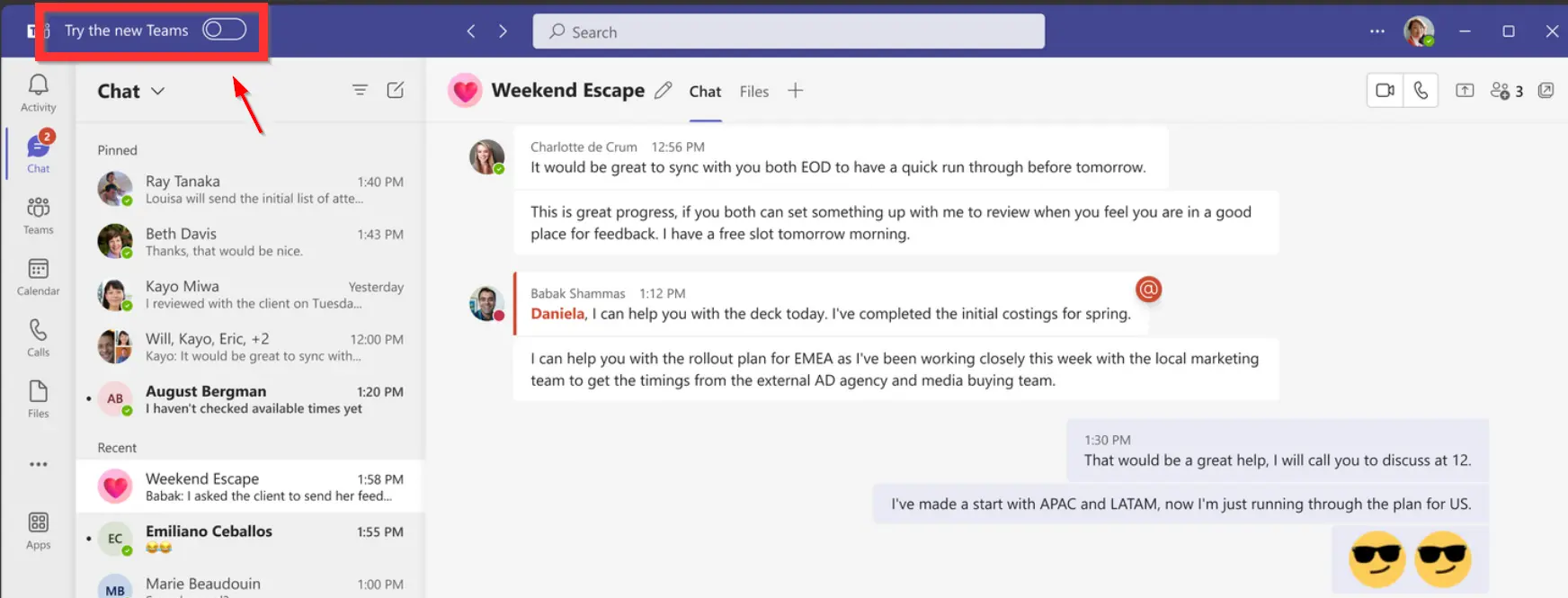
Once you now restart Teams on your Windows PC (the preview is not yet available for mobile devices and MAC), a slider marked "New Teams" will appear in the top left corner of the purple bar. Flip this slider and click through the pop-out window. Your Teams app will now restart and open in the new environment. You can now playfully get to know Teams again.
As a customer of IT Local
Are you a customer with us? Then you will start working with the Teams update from the moment Microsoft has officially rolled out the new environment. And that's sometime later this year. Of course, we don't just flip the switch for you. We test everything beforehand, inform you well in advance of the conversion date and take you through all the changes and possibilities. In any case, we are very excited about the upcoming changes and look forward to getting started with the brand-new version!
Want to know more or get started concretely?
In this article, we briefly took you through our experiences with the 'new' Teams. Did it help you? Are you curious about how an online collaboration tool like Microsoft Teams can work for your organisation? Of course we would be happy to help you further. If you would like a non-committal chat or are interested in our cloud solutions and adoption approach, please feel free to contact us at .